OUR PRODUCT · CODESGENII POS
Billing that neverstops for the internet.
CodesGenii POS is point of sale and retail management software for Windows. Billing, stock, udhaar, cash shifts and reports in one app, built for Pakistani shops, supermarkets and multi-branch retailers.
- Windows 10 / 11
- Works offline
- Urdu & English
- Version 1.0.0
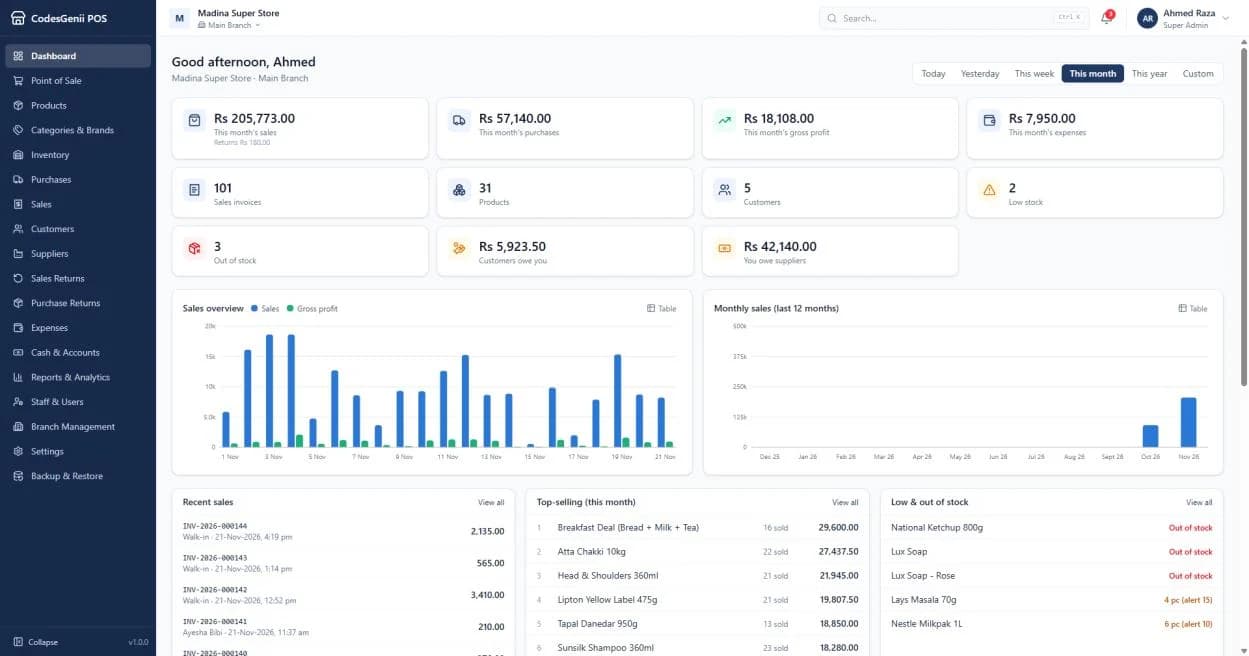
01 / WHO IT IS FOR
Made for the wayshops really work.
Prices in rupees, thermal receipts, retail and wholesale customers, credit accounts and a complete Urdu interface. No adapting a foreign system to local habits.
- Kiryana and general stores, supermarkets and marts
- Cosmetics, stationery, hardware, garments and other retail shops
- Wholesalers who sell to shops on credit
- Businesses with more than one branch
02 / HIGHLIGHTS
Everything a shopdoes, every day.
From the first scan at the counter to the owner's monthly profit report, it all happens in one place.
Fast checkout
Scan barcodes, sell loose items by weight and split payments across cash, card, bank transfer and wallets like JazzCash, Easypaisa and Raast.
Works offline
Everything runs on the shop PC. No internet needed for billing, and your data stays with you, not on someone else's server.
Accurate stock
Every sale, purchase, return and adjustment is recorded in a stock ledger, with low-stock alerts, stock counts and branch transfers.
Credit (udhaar)
Customer and supplier accounts with credit limits, statements and payment collection, so you always know who owes what.
Clear reports
Sales, profit, stock, cash flow, receivables and payables. Print them or export to Excel and PDF in one click.
Urdu and English
Switch the whole app to Urdu on any PC, and print receipts in Urdu for your customers.
03 / A LOOK INSIDE
Designed for abusy counter.
Real screens from a demonstration shop with sample data.
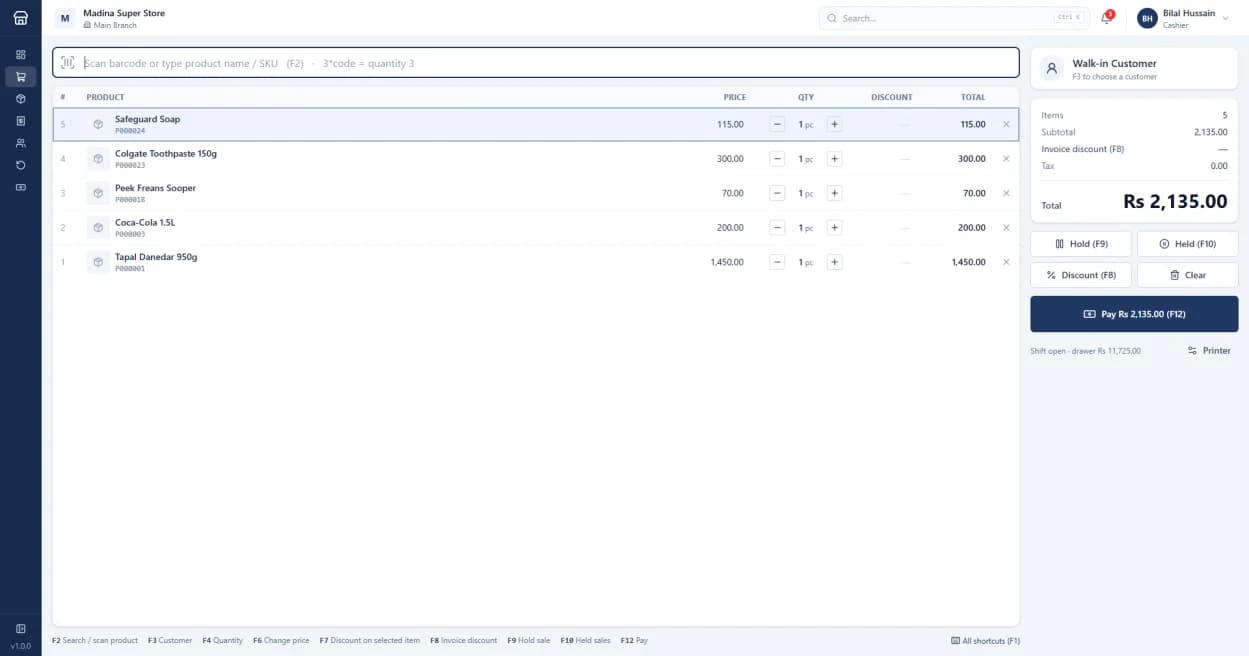
01 / SCREEN
Billing screen
Scan or search, and the item is in the cart. Every action has a keyboard shortcut, so the queue keeps moving.
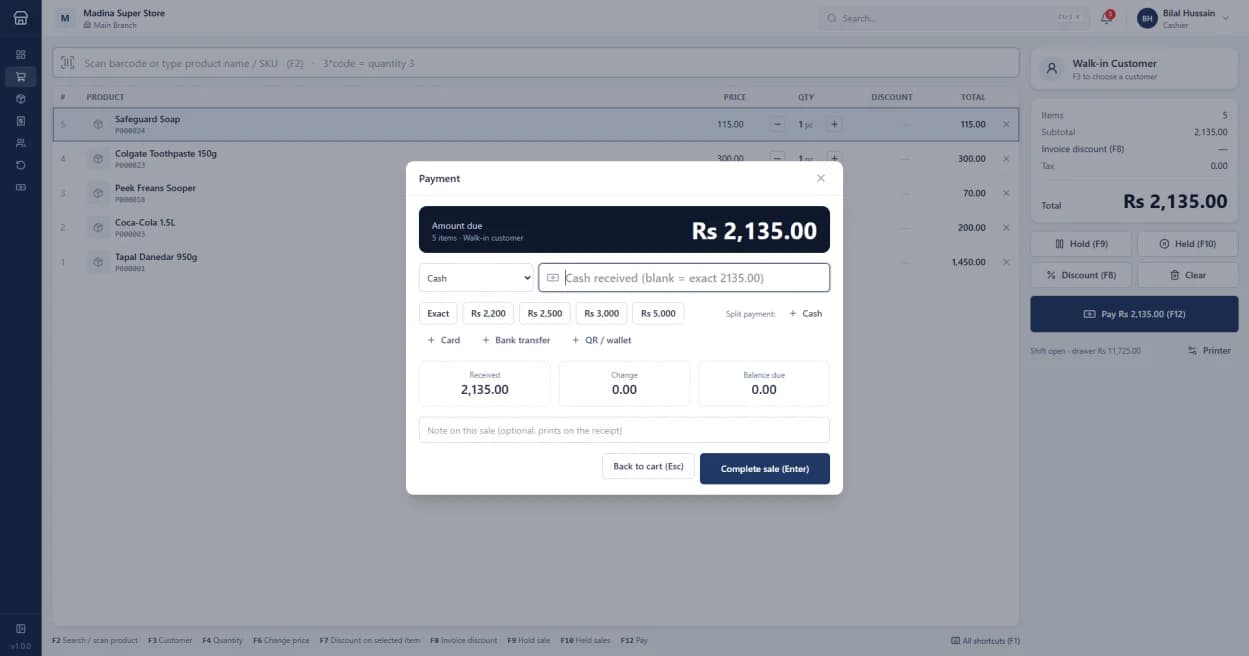
02 / SCREEN
Split payments
Cash with quick amounts and change, or split across card, bank transfer and wallets. Any unpaid part becomes customer credit.
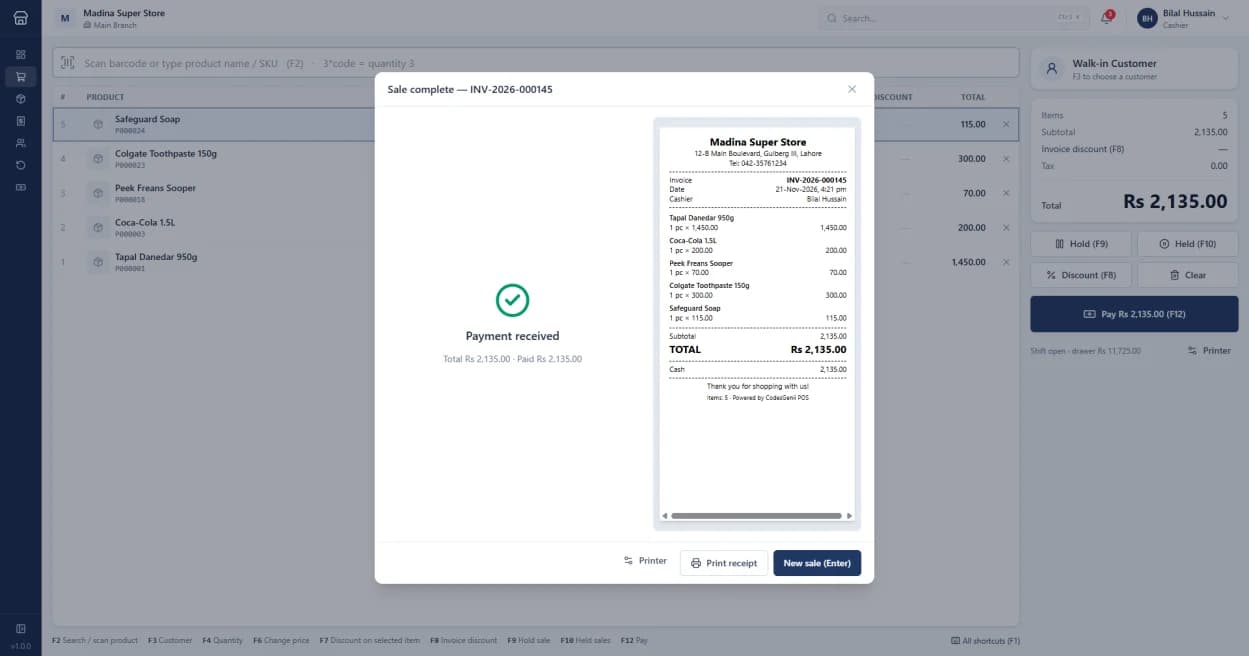
03 / SCREEN
Receipts
58 mm and 80 mm thermal receipts or A4 invoices, in English or Urdu. No printer? Receipts are saved as PDF.
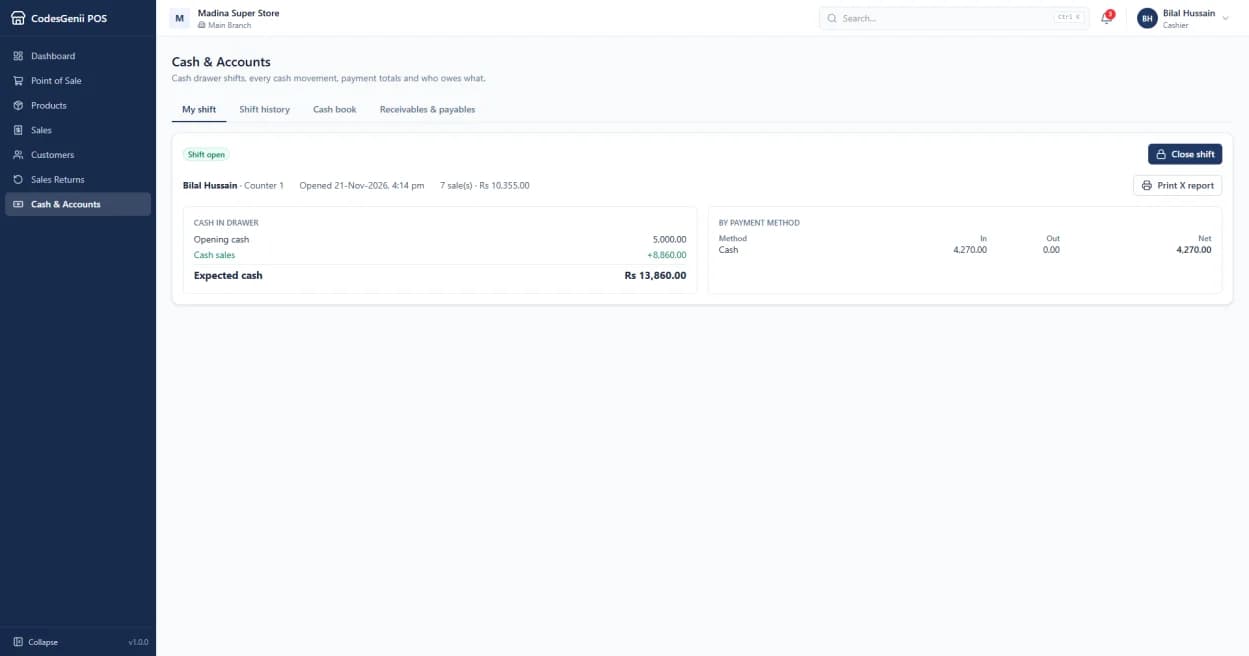
04 / SCREEN
Cash shifts
Each cashier opens and closes a shift. The system knows how much cash should be in the drawer, so shortages show up at once.
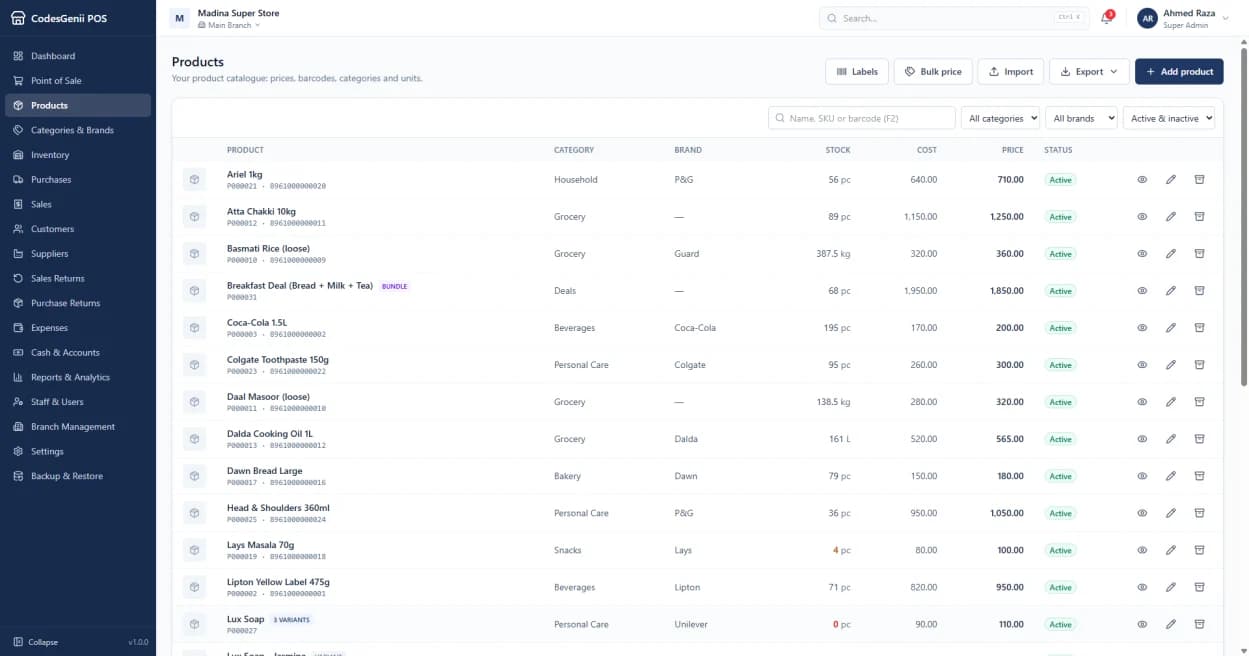
05 / SCREEN
Products & catalogue
Retail, wholesale and purchase prices, several barcodes per product, variants, bundle deals and Excel import.
04 / ALL FEATURES
One app insteadof five registers.
- Point of sale with barcode scanning, hold & resume and keyboard shortcuts
- Discounts and price changes with supervisor approval
- Wholesale prices for wholesale customers, applied automatically
- Products, categories, brands, units, barcodes and label printing
- Excel/CSV product import and export, bulk price updates
- Inventory with a full stock ledger, stock counts and branch transfers
- Purchases, supplier ledgers, sales returns and purchase returns
- Customer credit (udhaar) with limits and statements
- Expenses, cash book and cashier shifts with X and Z reports
- Dashboard and reports with Excel and PDF export
- Staff roles, permissions and a full activity log
- Multiple branches with their own stock, cash and invoice numbers
- Automatic, verified backups and one-click restore
- Global search from anywhere with Ctrl+K
05 / PLANS & PRICING
Simple pricing,every feature.
Start with a 30-day free trial on any PC, with every feature unlocked and no key needed. One licence covers a branch with up to 4 PCs.
Monthly
Rs 2,000
per branch / month
- All features
- Up to 4 PCs per branch
- Updates and support
Yearly
BEST VALUERs 24,000
per branch / year
- All features
- Up to 4 PCs per branch
- Updates and support
Extra PC
Rs 1,000
per additional PC
- Adds a PC to the same branch licence
Installation & training
Rs 5,000
one time
- On-site or remote setup
- Data import
- Staff training
06 / REQUIREMENTS
Runs on the PCyou already have.
No special hardware. A normal Windows PC, a barcode scanner and a thermal printer are all a shop needs.
- Computer
- Windows 10 or 11 (64-bit), 4 GB RAM, 1 GB free disk space
- Screen
- 1366 × 768 or higher
- Barcode scanner
- Any USB or wireless scanner that types like a keyboard
- Receipt printer
- 58 mm or 80 mm thermal printer with a Windows driver
- Invoices & reports
- Any A4 printer, or save as PDF
- Internet
- Not needed for billing. Needed for licence activation and updates, at least once every 14 days
07 / FAQ
POS questions,answered.
Yes. Billing, stock and reports all run on the shop's own PC. The internet is only needed for licence activation and updates, at least once every 14 days.
Yes. Every new PC gets a 30-day free trial with every feature unlocked. No licence key is needed to start.
Any USB or wireless barcode scanner that types like a keyboard, 58 mm or 80 mm thermal receipt printers with a Windows driver, A4 printers and label printers.
Yes. Each branch has its own stock, cash and invoice numbers, while products, customers and suppliers are shared. One licence covers a branch with up to 4 PCs.
Yes. Any PC can switch the whole interface to Urdu, and receipts can be printed in Urdu. Product and customer names stay exactly as you entered them.
CodesGenii POS makes automatic, verified backups that you can point at a USB drive. Restoring on a new PC takes a few clicks, and you can export all business data to Excel at any time.
LET'S TALK
Ready to see itin your shop?
Call +92 326 3373331 or send a message for a free demo. Support is available Monday to Friday, 9am to 6pm. We reply within one business day. (placeholder)